Download
Stremio
iPhone & iPad Guide

Install Stremio on iPhone & iPad

As of August 2025, Stremio has a native iOS app. You can also use the web client on any iPhone or iPad with an external player for full addon support.

Important: A debrid service (like Real-Debrid or TorBox) is required for Stremio to work on iOS. Without one, streams will not play on iPhone or iPad. See our Addons Guide for debrid setup instructions.

Recommended method. The native iOS app launched in August 2025 and is the easiest way to use Stremio on iPhone and iPad. Requires iOS 15 or later and a debrid service.

1
Get a debrid service first
Before installing Stremio on your iPhone, you need an active debrid subscription. Real-Debrid is the most popular choice (from ~$3/month for 6 months). Others include AllDebrid and TorBox.

Full instructions on choosing and configuring a debrid service are in our Addons Guide.

2
Download Stremio from the App Store
Open the App Store on your iPhone or iPad, search for "Stremio", and tap Get to install the free app. Make sure you are downloading the official app by Stremio.
3
Open Stremio and log in
Launch Stremio and sign in with your account. All your addons from other devices will sync automatically — no need to set them up again.
4
Set up Torrentio with your debrid service
If you haven't set up Torrentio yet, open a browser on your phone and go to torrentio.strem.fun. Configure it with your debrid provider and API key, then install it. The addon will appear in Stremio immediately.

It's easier to configure Torrentio from a computer first — the settings will sync to your iPhone automatically.
5
Start streaming
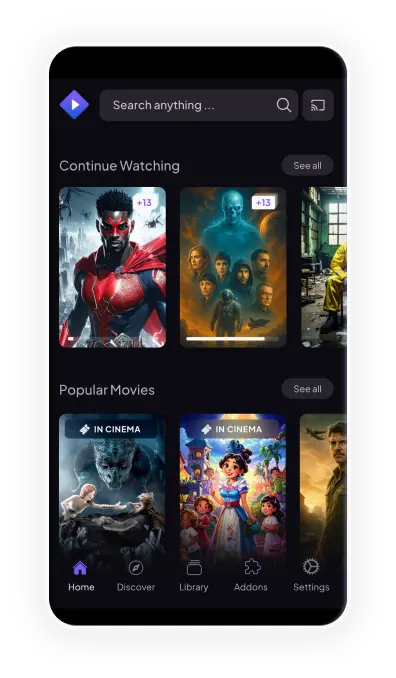
Search for any movie or show in Stremio and tap a stream. With your debrid service connected, content plays instantly in the highest available quality.
Stremio on iPhone

This method works on any iPhone or iPad using Safari or Chrome. It requires a debrid service and an external video player app like Outplayer or VLC.

1
Install an external video player
Download Outplayer (free, recommended) or VLC from the App Store. These apps handle the video streams that Stremio sends to them.
2
Open the Stremio Web Client
In Safari on your iPhone, go to web.stremio.com and log in with your Stremio account.

Add the page to your Home Screen (tap Share → Add to Home Screen) for a native-like experience that launches without the browser UI.

3
Configure an external player in settings
In Stremio web, go to Settings → Player and choose External Player. Select Outplayer or VLC as your player. This routes streams from Stremio to the installed player app.
4
Browse and play content
Search for any movie or show. Tap a stream and Stremio will open it in your chosen external player. Debrid streams play at full speed with no buffering.

Without a debrid service, most streams will fail on iOS. If you haven't set one up yet, read the Addons Guide first.

Need help with addons or debrid setup?

Our complete addons guide covers Torrentio, Real-Debrid, streaming catalogs, and more.

Independent fan guide. Not affiliated with Stremio or Apple Inc.

© 2026 stremio-dl.com